Hack Telkomsel Flash

sedikit iseng gpp kale y…lmyan kan bisa gratis internetan xixixixixix……
(ngirit mode on)
berangkat mnju makam kramat ah…..(tapa kaleeee)
pertama,,isep dlu neh sesajen nya!! xixixixii…..
Your freedom
OpenVpn GUI
Cc cleaner
klo udah,,simpen dlu deh
Buka app OpenVpn Gui yg brusan di dunlut…
trus buka app your freedom setting(configuration) :
server c0necti0n.
-addres = 87.98.243.21
-[port = 53
-conection m0de = UDP
server connectinnya pilih(ceklis) yg :
- automatically swicth server
- reconect after server shutd0wn
- enable encryption
- enable re-keying
sekarang giliran yg di sebelahnya…
-minimum buffer size = 1500
-RTT … Read Moremeasurement = 300000
-keepalive internal = 25000
-initial post size = 25000000
-minimum post size = 5000
-FTP mode = both,,
abiz ntu pindah ke ports
ceklis..
- SOCKS 4/5
- Web Proxy
- Open vpn
sekarang masuk ke account information..
-username = qqqq
-pasw0rd = 123456
save trus close…
nah…biz itu sekarang setting mozilla atau browser yg dipakai buadth browsing….
sedikit catatan:
yg pake mozzila : klik ‘tools’ kemudian pilih ‘option’..
kemudian klik ‘advance’ pilih ‘network’ kemudian klik ‘setting’ connection
kemudian klik ‘manual proxy configuration’ OK.
cara connectnya:
buka :
- Openvpn gui
- aktifin nokia pc suite
- connect to internet
- c0nfigurasi/setting
- ganti yg pilihan ke dua..
- isi acces pointnya = flash
- conetct..
sekarang buka y0ur freed0m, setelah itu tunggu sampe jendela nya terbuka semuanya………????
ya udah 0nline…

SKIN WINAMP


hay,guys kalian mau skin winamp yang ada di atas download aja di sini
                                                                    DOWNLOAD

Pengertian Mainboard ( MOTHERBOARD )

PENGERTIAN DAN FUNGSI MOTHERBOARD
Pengertian dan Fungsi Motherboard
PENGERTIAN DAN FUNGSI MOTHERBOARD
Motherboard atau mainboard merupakan papan utama dimana terdapat komponen-komponen serta chip controller yang bertugas mengatur lalu lintas data dalam sistem motherboard. Pada Motherboard juga terdapat socket untuk processor, slot-slot yang digunakan untuk pemasangan komponen kartu seperti VGA Card, Sound Card, Internal Modem, dan lain-lain.
Motherboard adalah Pusat pengendali yang mengatur kerja dari semua komponen yang terpasang pada mother board. Mengatur pemberian daya listrik pada setiap komponen PERSONAL COMPUTER.  Lalu lintas data semuanya diatur oleh motherboard, mulai dari peranti peyimpanan (harddisk, CD-ROM), peranti masukan data (keyboard, mouse, scanner), atau printer untuk mencetak. Motherboard dibagi menjadi 3 bagian, yaitu : Value (terjangkau) Mainstream (menengah) High End (kelas atas) Motherboard memiliki dua ukuran, yang disebut ATX dan Micro-ATX. Chipset merupakan “jantung” dari Motherboard. Pilihlah chipset dengan teknologi paling akhir, agar dapat menggunakan devices & periferal terbaru. Contohnya : mendukung Processor Intel LGA775, RAM DDR/DDR2, Hard Disk Serial ATA, dsb. Produsen chipset yang umum di Indonesia antara lain : Intel, Via dan SiS.Driver adalah aplikasi yang berfungsi untuk “memperkenalkan” devices atau periferalyang dipasang pada Motherboard, misalnya VGA Card, Printer, CD ROM dan sebagainya. Tanpa driver, perangkat tersebut tidak dapat berjalanan atau dikenali oleh sistem PC. Pastikan Motherboard telah dilengkapi dengan CD Driver yang up-to-datedsehingga dapat mengenali perangkat terbaru.Arti istilah Jumper dianggap berkaitan erat dengan pengertian berikut :Bentuk yang sederhana dari switch on/of. Umumnya jumper ini berukuran amat kecildan terbuat dari logam yang terbungkus plastik. Dimana biasanya digunakan untukmenentukan setting suatu fungsi seperti besaran frekuensi, BIOS, dll

Pengertian Mainboard dapat kita runut dari kata pembentuknya. Kata mainboard dalam istilah komputer yang merupakan serapan dari bahasa Inggris yang seperti kita ketahui terdiri dari kata “main” yang artinya utama. Dan kata “board” yang artinya papan. Sehingga jika diterjemahkan secara langsung, arti mainboard adalah “papan utama”.
Secara definitif, mainboard diartikan sebagai sebuah papan circuit utama tempat terpasangnya beberapa komponen seperti VGA card, Lan Cards memory, TV Tuner, Video card, dan lainnya. Singkatnya, pengertian mainboard adalah papan rangkain utama pada komputer, dimana processor, memori, dan periphreal lainnya terpasang. Mainboard terkadang disebut pula dengan motherboard. Kita tidak perlu bingung akan penyebutan mainboard atau motherboard, karena kata motherboard juga memiliki arti yang hampir sama, yakni “papan induk. Sebuah mainboard biasanya sebuah mainboard terpasang di dalam CPU.
Dalam dunia bisnis dan jual beli komputer kita mungkin akan menemui singkatan “MB” untuk mainboard. Dan secara kebetulan, singkatan ini juga bisa digunakan untuk kata motherboard. Dengan demikian, baik singkatan maupun pengertian mainboard memiliki persamaan dengan pengertian motherboard.


cara hack modem smartfren ( internetan unlimited gratis)

langsung ke caranya aja ya sob : dial dulu modem sob pake kartu smartfren dan coba aja ke chome or firefox, lalu ketikkan:
Code:
smartfren.com@url:google.com
dan coba liat halaman pencarian google kebuka... jd ada vuln disitu.

yuk kita gabungin pake proxy....

ne software yg akn kita butuhkan.. dpt di donlot disini

langsung saja!
1. Install program ispce td, trus buka, beri centang pada query mode, dan kita atur listen portx 127 biar gampang nantinya. klik OK.
[Image: Capture1.JPG]
2. Coz domain yg hanya bisa diakses saat pulsa smart sob habis "nol" adalh smartfren.com, smart-telecom.co.id, dan jump.smart-telecom.co.id, jadi masuklah pd Query URL Configuration, pilih front query, trus masukkan salah satu domain tsb pd font query + simbol "@".
[Image: Capture2.JPG]
3. Kita beralih pd proxy configuration, unk proxy server silahkan cari sendiri, dgn catatan proxy dgn port 80 dan 3128 yg hanya bisa dgunakan disini, coz pihak smartfren mungkin hanya membuka kedua port tsb. unk proxy cari di google sendiri ea ato ke hidemyass.com banyak koq.. cari yang fast proxy, biar liar larinyaaa,,, hehehehhe
Ato kalo gak pengen repot pake aja ne proxy, tp gak ane jamin, lemoootnya ampuuunnn..!!
[Image: Capture.JPG]
4. Udahan dulu, klik REFRESH 3x, lalu minimize, jangan di-exit!!

next...

buka firefox. ke menu Options - Advanced - Network - Setting. Atur http proxy 127.0.0.1, dan gunakan listen portx yg tadi yaitu 127., berikan centang pd use this proxy.........
kemudian kosongkan pd No proxy for.
[Image: Capture.JPG]
dan silahkan menikmati yg gratisan.

Bagi sob yg daerahx sudah tercover EVDO n make perangkat (modem) yg mendukung kecepatan EVDO rev A ato rev B,. pihak smart tdk membatasi bandwidth (kecepatan), speed bisa mencapai 3.1 Mbps ato sekitar 396,8 kb per detik. (bedakan antara bit dgn byte, 1 bytes= 8 bit)
Unk daerah yg hanya trdapat jaringan CDMA 1x cuma bs donlot sampek 19 kb per detik. jadi yg sabar aja ya..... heheheh
[Image: 261812_247337965277544_100000040266345_1...7237_n.jpg]

NOTE :
1. Pertama, agar gratisan dapat digunakan pd browser chrome da IE, pd browser IE masuklah ke Internet Options - Connections, pilih pd koneksi yg sedang sob gunakan, klik Settings. Masukkan proxy dan portnya seperti pd firefox td. lalu klik OK. OK lagi. dan OK lagi.
[Image: Capture.JPG]
Agar bisa dgunakan unk mendownload lewat IDM, pilih Download - Options - Proxy, berikan centang dan masukkan proxy di Use Http proxy. Klik OK.
[Image: Capture.JPG]
2. Kedua, beberapa situs ato blog mungkin tidak dpt dbuka dg sempurna, ataupun tdk dpt dibuka sama sekali, misl: mail.google.com, mail.yahoo.com. coz menggunakan protokol HTTPS yg mungkin perluh make port selain yg ane cantumkan d ats.

Random access memory (RAM)

Random access memory (RAM) is a form of computer data storage. Today, it takes the form of integrated circuits that allow stored data to be accessed in any order with a worst case performance of constant time. Strictly speaking, modern types of DRAM are therefore not random access, as data is read in bursts, although the name DRAM / RAM has stuck. However, many types of SRAM, ROM, OTP, and NOR flash are still random access even in a strict sense. RAM is often associated with volatile types of memory (such as DRAM memory modules), where its stored information is lost if the power is removed. Many other types of non-volatile memory are RAM as well, including most types of ROM and a type of flash memory called NOR-Flash. The first RAM modules to come into the market were created in 1951 and were sold until the late 1960s and early 1970s.
Other memory devices (magnetic tapes, disks) can access the storage data only in a predetermined order, because of mechanical design limitations.

Contents

 [hide

[edit] History

1 Megabit chip - one of the last models developed by VEB Carl Zeiss Jena in 1989
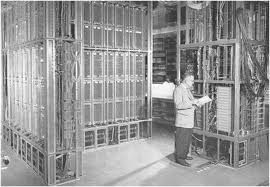
Early computers used relays, or delay lines for "main" memory functions. Ultrasonic delay lines could only reproduce data in the order it was written. Drum memory could be expanded at low cost but retrieval of non-sequential memory items required knowledge of the physical layout of the drum to optimize speed. Latches built out of vacuum tube triodes, and later, out of discrete transistors, were used for smaller and faster memories such as random-access register banks and registers. Such registers were relatively large, power-hungry and too costly to use for large amounts of data; generally only a few hundred or few thousand bits of such memory could be provided.
The first practical form of random-access memory was the Williams tube starting in 1947. It stored data as electrically-charged spots on the face of a cathode ray tube. Since the electron beam of the CRT could read and write the spots on the tube in any order, memory was random-access. The capacity of the Williams tube was a few hundred to around a thousand bits, but it was much smaller, faster, and more power-efficient than using individual vacuum tube latches.
Magnetic core memory invented in 1947 and developed up until the mid 1970's became a widespread form of random access memory. It relied on an array of magnetized rings; by changing the sense of magnetization, data could be stored, with each bit represented physically by one ring. Since every ring had a combination of address wires to select and read or write it, access to any memory location in any sequence was possible.
Magnetic core memory was the standard form of memory system until displaced by solid-state memory in integrated circuits, starting in the early 1970's. Robert H. Dennard invented Dynamic random access memory in 1968; this allowed replacement of a 4 or 6-transistor latch circuit by a single transistor for each memory bit, greatly increasing memory density at the cost of voltatility. Data was stored in the tiny capacitance of each transistor, and had to be periodically refreshed in a few milliseconds before the charge could leak away.
Prior to the development of integrated Read-only memory (ROM) circuits, permanent (or read-only) random-access memory was often constructed using diode matrices driven by address decoders, or specially wound core rope memory planes.

Types of RAM

Top L-R, DDR2 with heat-spreader, DDR2 without heat-spreader, Laptop DDR2, DDR, Laptop DDR
The two main forms of modern RAM are static RAM (SRAM) and dynamic RAM (DRAM). In static RAM, a bit of data is stored using the state of a flip-flop. This form of RAM is more expensive to produce, but is generally faster and requires less power than DRAM and, in modern computers, is often used as cache memory for the CPU. DRAM stores a bit of data using a transistor and capacitor pair, which together comprise a memory cell. The capacitor holds a high or low charge (1 or 0, respectively), and the transistor acts as a switch that lets the control circuitry on the chip read the capacitor's state of charge or change it. As this form of memory is less expensive to produce than static RAM, it is the predominant form of computer memory used in modern computers.
Both static and dynamic RAM are considered volatile, as their state is lost or reset when power is removed from the system. By contrast, Read-only memory (ROM) stores data by permanently enabling or disabling selected transistors, such that the memory cannot be altered. Writeable variants of ROM (such as EEPROM and flash memory) share properties of both ROM and RAM, enabling data to persist without power and to be updated without requiring special equipment. These persistent forms of semiconductor ROM include USB flash drives, memory cards for cameras and portable devices, etc. As of 2007, NAND flash has begun to replace older forms of persistent storage, such as magnetic disks and tapes, while NOR flash is being used in place of ROM in netbooks and rugged computers, since it is capable of true random access, allowing direct code execution.
ECC memory (which can be either SRAM or DRAM) includes special circuitry to detect and/or correct random faults (memory errors) in the stored data, using parity bits or error correction code.
In general, the term RAM refers solely to solid-state memory devices (either DRAM or SRAM), and more specifically the main memory in most computers. In optical storage, the term DVD-RAM is somewhat of a misnomer since, like CD-RW, a rewriteable DVD must be erased before it can be rewritten.

Memory hierarchy

One can read and over-write data in RAM. Many computer systems have a memory hierarchy consisting of CPU registers, on-die SRAM caches, external caches, DRAM, paging systems, and virtual memory or swap space on a hard drive. This entire pool of memory may be referred to as "RAM" by many developers, even though the various subsystems can have very different access times, violating the original concept behind the random access term in RAM. Even within a hierarchy level such as DRAM, the specific row, column, bank, rank, channel, or interleave organization of the components make the access time variable, although not to the extent that rotating storage media or a tape is variable. The overall goal of using a memory hierarchy is to obtain the higher possible average access performance while minimizing the total cost of the entire memory system (generally, the memory hierarchy follows the access time with the fast CPU registers at the top and the slow hard drive at the bottom).
In many modern personal computers, the RAM comes in an easily upgraded form of modules called memory modules or DRAM modules about the size of a few sticks of chewing gum. These can quickly be replaced should they become damaged or when changing needs demand more storage capacity. As suggested above, smaller amounts of RAM (mostly SRAM) are also integrated in the CPU and other ICs on the motherboard, as well as in hard-drives, CD-ROMs, and several other parts of the computer system.

Other uses of RAM

In addition to serving as temporary storage and working space for the operating system and its applications, RAM is used in numerous other ways.

Virtual memory

Most modern operating systems employ a method of extending RAM capacity, known as "virtual memory". A portion of the computer's hard drive is set aside for a paging file or a scratch partition, and the combination of physical RAM and the paging file form the system's total memory. (For example, if a computer has 2 GB of RAM and a 1 GB page file, the operating system has 3 GB total memory available to it.) When the system runs low on physical memory, it can "swap" portions of RAM to the paging file to make room for new data, as well as to read previously swapped information back into RAM. Excessive use of this mechanism results in thrashing and generally hampers overall system performance, mainly because hard drives are far slower than RAM.

RAM disk

Software can "partition" a portion of a computer's RAM, allowing it to act as a much faster hard drive that is called a RAM disk. A RAM disk loses the stored data when the computer is shut down, unless memory is arranged to have a standby battery source.

Shadow RAM

Sometimes, the contents of a relatively slow ROM chip are copied to read/write memory to allow for shorter access times. The ROM chip is then disabled while the initialized memory locations are switched in on the same block of addresses (often write-protected). This process, sometimes called shadowing, is fairly common in both computers and embedded systems.
As a common example, the BIOS in typical personal computers often has an option called “use shadow BIOS” or similar. When enabled, functions relying on data from the BIOS’s ROM will instead use DRAM locations (most can also toggle shadowing of video card ROM or other ROM sections). Depending on the system, this may not result in increased performance, and may cause incompatibilities. For example, some hardware may be inaccessible to the operating system if shadow RAM is used. On some systems the benefit may be hypothetical because the BIOS is not used after booting in favor of direct hardware access. Free memory is reduced by the size of the shadowed ROMs.[1]

Recent developments

Several new types of non-volatile RAM, which will preserve data while powered down, are under development. The technologies used include carbon nanotubes and approaches utilizing the magnetic tunnel effect. Amongst the 1st generation MRAM, a 128 KiB (128 × 210 bytes) magnetic RAM (MRAM) chip was manufactured with 0.18 µm technology in the summer of 2003. In June 2004, Infineon Technologies unveiled a 16 MiB (16 × 220 bytes) prototype again based on 0.18 µm technology. There are two 2nd generation techniques currently in development: Thermal Assisted Switching (TAS)[2] which is being developed by Crocus Technology, and Spin Torque Transfer (STT) on which Crocus, Hynix, IBM, and several other companies are working.[3] Nantero built a functioning carbon nanotube memory prototype 10 GiB (10 × 230 bytes) array in 2004. Whether some of these technologies will be able to eventually take a significant market share from either DRAM, SRAM, or flash-memory technology, however, remains to be seen.
Since 2006, "Solid-state drives" (based on flash memory) with capacities exceeding 256 gigabytes and performance far exceeding traditional disks have become available. This development has started to blur the definition between traditional random access memory and "disks", dramatically reducing the difference in performance.
Some kinds of random-access memory, such as "EcoRAM", are specifically designed for server farms, where low power consumption is more important than speed.[4]

Memory wall

The "memory wall" is the growing disparity of speed between CPU and memory outside the CPU chip. An important reason for this disparity is the limited communication bandwidth beyond chip boundaries. From 1986 to 2000, CPU speed improved at an annual rate of 55% while memory speed only improved at 10%. Given these trends, it was expected that memory latency would become an overwhelming bottleneck in computer performance.[5]
Currently, CPU speed improvements have slowed significantly partly due to major physical barriers and partly because current CPU designs have already hit the memory wall in some sense. Intel summarized these causes in their Platform 2015 documentation (PDF)
“First of all, as chip geometries shrink and clock frequencies rise, the transistor leakage current increases, leading to excess power consumption and heat... Secondly, the advantages of higher clock speeds are in part negated by memory latency, since memory access times have not been able to keep pace with increasing clock frequencies. Third, for certain applications, traditional serial architectures are becoming less efficient as processors get faster (due to the so-called Von Neumann bottleneck), further undercutting any gains that frequency increases might otherwise buy. In addition, partly due to limitations in the means of producing inductance within solid state devices, resistance-capacitance (RC) delays in signal transmission are growing as feature sizes shrink, imposing an additional bottleneck that frequency increases don't address.”
The RC delays in signal transmission were also noted in Clock Rate versus IPC: The End of the Road for Conventional Microarchitectures which projects a maximum of 12.5% average annual CPU performance improvement between 2000 and 2014. The data on Intel Processors clearly shows a slowdown in performance improvements in recent processors. However, Intel's Core 2 Duo processors (codenamed Conroe) showed a significant improvement over previous Pentium 4 processors; due to a more efficient architecture, performance increased while clock rate actually decreased

Sejarah Komputer dan Perkembanganya

>Sejarah Komputer dan Perkembanganya – Sejak dahulu, proses pengolahan data telah dilakukan oleh manusia. Manusia juga menemukan alat-alat mekanik dan elektronik untuk membantu manusia dalam penghitungan dan pengolahan data supaya bisa mendapatkan hasil lebih cepat. Komputer yang kita temui saat ini adalah suatu evolusi panjang dari penemuan-penemuan manusia sejak dahulu kala berupa alat mekanik maupun elektronik
Saat ini komputer dan piranti pendukungnya telah masuk dalam setiap aspek kehidupan dan pekerjaan. Komputer yang ada sekarang memiliki kemampuan yang lebih dari sekedar perhitungan matematik biasa. Diantaranya adalah sistem komputer di kassa supermarket yang mampu membaca kode barang belanja, sentral telepon yang menangani jutaan panggilan dan komunikasi, jaringan komputer dan internet yang menghubungkan berbagai tempat di dunia.
Sejarah Komputer menurut periodenya adalah:
  • Alat Hitung Tradisional dan Kalkulator Mekanik
  • Komputer Generasi Pertama
  • Komputer Generasi Kedua
  • Komputer Generasi Ketiga
  • Komputer Generasi Keempat
  • Komputer Generasi Kelima
Sejarah Komputer
1. Komputer Generasi Pertama (1946­ – 1959)
Dengan terjadinya Perang Dunia II, negara­negara yang terlibat dalam perang tersebut berusaha mengembangkan untuk mengeksploit potensi strategis yang dimiliki komputer.
Hal ini meningkatkan pendanaan pengembangan komputer serta mempercepat kemajuan teknik komputer.
(1) Colassus
(2) Mark I
(3) ENIAC
(4) EDVAC
(5) UNIVAC I
Ciri komputer generasi pertama adalah:
- Penggunaan tube vakum (yang membuat komputer pada masa tersebut berukuran sangat besar)
- Adanya silinder magnetik untuk penyimpanan data.
- Instruksi operasi dibuat secara spesifik untuk suatu tugas tertentu.
- Setiap komputer memiliki program kode­biner yang berbeda yang disebut “bahasa mesin” (machine language). Hal ini menyebabkan komputer sulit untuk diprogram dan membatasi kecepatannya.
2. Komputer Generasi Kedua (1959­ – 1964)
Stretch dan LARC
Mesin pertama yang memanfaatkan teknologi baru ini adalah superkomputer. IBM membuat superkomputer bernama Stretch, dan Sprery­ Rand membuat komputer bernama LARC. Komputer­komputer ini,yang dikembangkan untuk laboratorium energi atom, dapat menangani sejumlah besar data, sebuah kemampuan yang sangat dibutuhkan oleh peneliti atom. Mesin tersebut sangat mahal dan cenderung terlalu kompleks untuk kebutuhan komputasi bisnis, sehingga membatasi kepopulerannya.
Hanya ada dua LARC yang pernah dipasang dan digunakan: satu di Lawrence Radiation Labs di Livermore, California, dan yang lainnya di US Navy Research and Development Center di Washington D.C. Komputer generasi kedua menggantikan bahasa mesin dengan bahasa assembly. Bahasa assembly adalah bahasa yang menggunakan singkatan­singakatan untuk menggantikan kode biner.
Pada awal 1960­an, mulai bermunculan komputer generasi kedua yang sukses di bidang bisnis, di universitas, dan di pemerintahan. Komputer generasi kedua ini merupakan komputer yang sepenuhnya menggunakan transistor. Mereka juga memiliki komponen­komponen yang dapat diasosiasikan dengan komputer pada saat ini: printer, penyimpanan dalam disket, memory, sistem operasi, dan program.
Ciri-ciri komputer pada generasi kedua:
- Penggunaan transistor sehingga ukurannya lebih kecil
- Adanya pengembangan memori inti­magnetik membantu pengembangan komputer generasi kedua yang lebih kecil, lebih cepat, lebih dapat diandalkan, dan lebih hemat energi dibanding para pendahulunya
- Penggantian dari bahasa mesin menjadi bahasa Asembly
- Muncul bahasa pemrograman COBOL dan FORTRAN
3. Komputer Generasi Ketiga (1964­ – 1970)
Walaupun transistor dalam banyak hal mengungguli tube vakum, namun transistor menghasilkan panas yang cukup besar, yang dapat berpotensi merusak bagian­bagian internal komputer. Batu kuarsa (quartz rock) menghilangkan masalah ini. Jack Kilby, seorang insinyur di Texas Instrument, mengembangkan sirkuit terintegrasi (IC : integrated circuit) di tahun 1958. IC mengkombinasikan tiga komponen elektronik dalam sebuah piringan silikon kecil yang terbuat dari pasir kuarsa.
Pada ilmuwan kemudian berhasil memasukkan lebih banyak komponen­komponen ke dalam suatu chiptunggal yang disebut semikonduktor. Hasilnya, komputer menjadi semakin kecil karena komponen­komponen dapat dipadatkan dalam chip. Kemajuan komputer generasi ketiga lainnya adalah penggunaan system operasi (operating system) yang memungkinkan mesin untuk menjalankan berbagai program yang berbeda secara serentak dengan sebuah program utama yang memonitor dan mengkoordinasi memori komputer.
Ciri-ciri komputer pada generasi ketiga:
- Penggunaan IC(Intregrated Circuit)
- Ukuran komputer menjadi lebih kecil
- Ditemukannya Sistem Operasi
4. Komputer Generasi Keempat (1979­ – sekarang)
Setelah IC, tujuan pengembangan menjadi lebih jelas: mengecilkan ukuran sirkuit dan komponen­komponen elektrik. Large Scale Integration (LSI) dapat memuat ratusan komponen dalam sebuah chip. Pada tahun 1980­ an, Very Large Scale Integration (VLSI) memuat ribuan komponen dalam sebuah chip tunggal. Ultra­Large Scale Integration (ULSI) meningkatkan jumlah tersebut menjadi jutaan. Kemampuan untuk memasang sedemikian banyak komponen dalam suatu keping yang berukurang setengah keping uang logam mendorong turunnya harga dan ukuran komputer. Hal tersebut juga meningkatkan daya kerja, efisiensi dan keterandalan komputer.
Chip Intel 4004 yang dibuat pada tahun 1971 membawa kemajuan pada IC dengan meletakkan seluruh komponen dari sebuah komputer (central processing unit, memori, dan kendali input/output) dalam sebuah chip yang sangat kecil. Sebelumnya, IC dibuat untuk mengerjakan suatu tugas tertentu yang spesifik. Sekarang, sebuah mikroprosesor dapat diproduksi dan kemudian diprogram untuk memenuhi seluruh kebutuhan yang diinginkan. Tidak lama kemudian, setiap perangkat rumah tangga seperti microwave oven, televisi, dan mobil dengan electronic fuel injection dilengkapi dengan mikroprosesor.
Perkembangan yang demikian memungkinkan orang­orang biasa untuk menggunakan komputer biasa. Komputer tidak lagi menjadi dominasi perusahaan­perusahaan besar atau lembaga pemerintah. Pada pertengahantahun 1970­an, perakit komputer menawarkan produk komputer mereka ke masyarakat umum. Komputer­komputer ini, yang disebut minikomputer, dijual dengan paket piranti lunak yang mudah digunakan oleh kalangan awam. Piranti lunak yang paling populer pada saat itu adalah program word processing dan spreadsheet. Pada awal 1980­an, video game seperti Atari 2600 menarik perhatian konsumen pada komputer rumahan yang lebih canggih dan dapat diprogram.
Pada tahun 1981, IBM memperkenalkan penggunaan Personal Computer (PC) untuk penggunaan di rumah, kantor, dan sekolah. Jumlah PC yang digunakan melonjak dari 2 juta unit di tahun 1981 menjadi 5,5 juta unit di tahun 1982. Sepuluh tahun kemudian, 65 juta PC digunakan. Komputer melanjutkan evolusinya menuju ukuran yang lebih kecil, dari komputer yang berada di atas meja (desktop computer) menjadi komputer yang dapat dimasukkan ke dalam tas (laptop), atau bahkan komputer yang dapat digenggam (palmtop).
IBM PC bersaing dengan Apple Macintosh dalam memperebutkan pasar komputer. Apple Macintosh menjadi terkenal karena mempopulerkan system grafis pada komputernya, sementara saingannya masih menggunakan komputer yang berbasis teks. Macintosh juga mempopulerkan penggunaan piranti mouse.
Pada masa sekarang, kita mengenal perjalanan IBM compatible dengan pemakaian CPU: IBM PC/486, Pentium, Pentium II, Pentium III, Pentium IV (Serial dari CPU buatan Intel). Juga kita kenal AMD k6, Athlon, dsb. Ini semua masuk dalam golongan komputer generasi keempat. Seiring dengan menjamurnya penggunaan komputer di tempat kerja, cara­ cara baru untuk menggali potensial terus dikembangkan. Seiring dengan bertambah kuatnya suatu komputer kecil, komputer­komputer tersebut dapat dihubungkan secara bersamaan dalam suatu jaringan untuk saling berbagi memori, piranti lunak, informasi, dan juga untuk dapat saling berkomunikasi satu dengan yang lainnya. Komputer jaringan memungkinkan komputer tunggal untuk membentuk kerjasama elektronik untuk menyelesaikan suatu proses tugas. Dengan menggunakan perkabelan langsung (disebut juga local area network, LAN), atau kabel telepon, jaringan ini dapat berkembang menjadi sangat besar.
Ciri-ciri komputer pada generasi keempat:
• Digunakannya LSI, VLSI, ULSI
• Digunakannya mikroprosesor
Banyak kemajuan di bidang disain komputer dan teknologi semakin memungkinkan pembuatan komputer generasi kelima. Dua kemajuan rekayasa yang terutama adalah kemampuan pemrosesan paralel, yang akan menggantikan model von Neumann. Model von Neumann akan digantikan dengan sistem yang mampu mengkoordinasikan banyak CPU untuk bekerja secara serempak. Kemajuan lain adalah teknologi superkonduktor yang memungkinkan aliran elektrik tanpa ada hambatan apapun, yang nantinya dapat mempercepat kecepatan informasi.
Jepang adalah negara yang terkenal dalam sosialisasi jargon dan proyek komputer generasi kelima. Lembaga ICOT (Institute for new Computer Technology) juga dibentuk untuk merealisasikannya. Banyak kabar yang menyatakan bahwa proyek ini telah gagal, namun beberapa informasi lain bahwa keberhasilan proyek komputer generasi kelima ini akan membawa perubahan baru paradigma komputerisasi di dunia. Kita tunggu informasi mana yang lebih valid dan membuahkan hasil.Anda bisa memperkaya wawasan seputar komputer dengan membaca artikel yang lainya pengertian komputer dan perangkat keras komputer itu apa sih? so silahkan baca.

Driver Untuk Lenovo

Silahkan anda kunjungi Driver Lenovo  muhammad farid